Table of Contents
After running Cube and launching Wwise, you're often asked to connect Wwise to Cube. This allows you to experience your sound design in the game environment and analyze information sent from the game to Wwise.
-
In the Wwise toolbar, click Connect to Remote Platform (Shift+H).

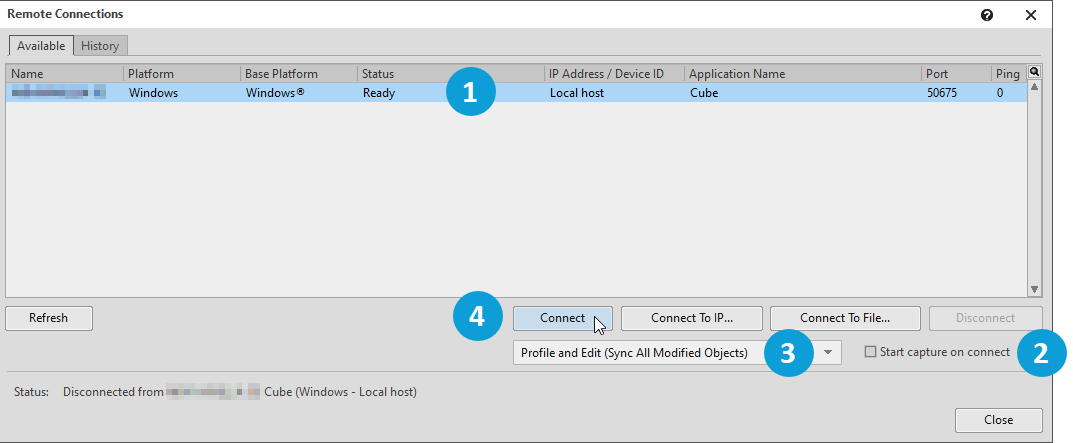
The Remote Connections dialog opens and lists all of the computers on the network that are running a game that uses the Wwise sound engine.
-
In the Remote Connections dialog, (1) select your computer, (2) deselect Start capture on connect, (3) ensure Profile and Edit (Sync All Modified Objects) is selected, and (4) click Connect.
Wwise Authoring is now connected to Cube. This means that the content of your project is reflected in the game for all Events and Game Syncs whose name is already programmed in the game. You can continue to make changes to your project while connected and you'll hear the changes in the game, allowing you to iterate quickly. You'll use this feature to test your design in Cube as you progress.
![[Note]](/images/wwise101/?source=wwise101&id=note.png)
Some games are designed differently, but for Cube, you must generate SoundBanks at least once before you can use Profile and Edit mode. Generating SoundBanks creates a file called
Init.bnk, which provides the game with the information it needs to communicate with the Wwise sound engine.