In Strata subprojects, the black region at the top of the ruler is known as the data region. The data region name provides values for wildcards, which are used when you render files in REAPER. This text contributes to the names of rendered files, the rendered file folder structure, and embedded metadata. Data regions span and provide information that applies to all other regions in the subproject.

The following string is used in the name of all Strata data regions:
CategoryFull=;Category=;SubCategory=;CatID=;UserCategory=;VendorCategory=;SourceID=;UserData=;Explanations=;Synonyms=;OpenTier=;
The following example shows a string that includes values from an Historical Firearms subproject named Pistol Muzzleloader. The bold text between the equals signs (=) and semicolons (;) are the values that will replace various REAPER wildcards when rendering files and embedding metadata.
CategoryFull= GUNS-ANTIQUE ;Category= GUNS ;SubCategory= ANTIQUE ;CatID= GUNAntq ;UserCategory=;VendorCategory= _Pistol Muzzleloader- ;SourceID= Historical Firearms ;UserData=;Explanations= Old black powder weapons, muskets. ;Synonyms= muzzleloader, musket, black powder, flintlock, longrifle, fire lance ;OpenTier= 18th Century-Muzzleloader-50Cal ;
A wildcard formula is defined in the REAPER Render to File dialog. This formula determines which parts of the data region name will be used in the names of rendered files and in which order those parts will appear. It also determines the names of the subfolders the rendered files will be saved in.

 |
The wildcard formula, which is used to create the file name and folder structure of all rendered files. All subprojects in Strata use the following formula: $region(Category)[;]/$region(SubCategory)[;]/$region(CatID)[;]$region(UserCategory)[;]$region(VendorCategory)[;]$region_$author_$region(SourceID)[;]$region(UserData)[;]. |
 |
The resulting destination folders and generated file names. |
Most of the wildcards used in the wildcard formula start with "$region". This means
the value of the wildcard will be taken from the data region name. For example, the
first wildcard, "$region(Category)[;]/", is replaced with the value of "Category" found
in the data region name. In the example above, this is the word "GUNS". Because the
wildcard ends with a forward slash, a folder called GUNS will be created
inside the Rendered folder. Wildcards that don't end with a slash are used
to create part of the rendered file name.
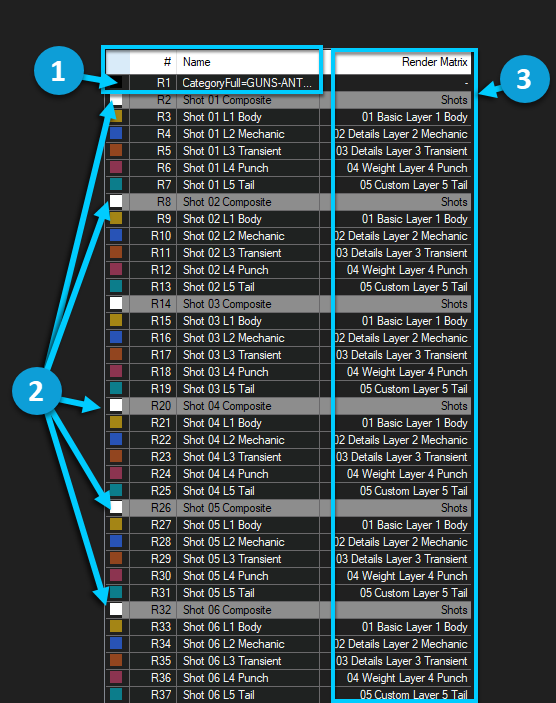
The regions that are selected to render also affect the names of the rendered files. The following image of the Region/Marker Manager shows how different regions and data are used when rendering files.
|
|
The data region name contains information that will form part of the file name as well the Rendered subfolder structure and the embedded metadata . See Customizing File Names and Metadatafor details on customizing this information. |
|
|
Regions selected to render. The region name also becomes part of the file name. If no regions are selected in the Region/Marker Manager, REAPER’s default behavior is to render all regions in the project. Note that the colors correspond to the layers and regions displayed above the timeline. |
 |
Regions are assigned to Render from the Output of the assigned Region Matrix Layer(s)/Track(s). |
For more detailed information about rendering options, refer to the REAPER User Guide.
A downloadable spreadsheet called a SoundBook is provided with each collection. Data region names are included in the SoundBook. For example, in the Historical Firearms SoundBook, open the REAPER File Name and MetaData Region Formula sheet for details.
Was this page helpful?
Need Support?
Questions? Problems? Need more info? Contact us, and we can help!
Visit our Support pageTell us about your project. We're here to help.
Register your project and we'll help you get started with no strings attached!
Get started with Wwise