
Rotating Ambisonics
As we have seen in Ambisonics as an Intermediate Spatial Representation (for VR), ambisonics is a multichannel audio format that can favorably represent the spatiality of an audio mix. An ambisonic audio file/mix/signal can thus be regarded as a sound field, a mixture of different sound sources coming from different directions and arriving at a listener's ears with different angles of incidence.
Rotation by matrixing
One useful property of the ambisonic representation is that it can be rotated very easily, by cleverly manipulating the matrix of mixing gains. In terms of resources (CPU and memory), this is equivalent to calculating panning gains; and, because this is done at every audio frame (~10-20 ms) instead of at every audio sample (~2 µs), it is orders of magnitude less demanding than filtering or even mixing (adding) audio signals.
After having rotated an ambisonic signal, you get a new ambisonic signal where the apparent angles of incidence of all its constituents have been rotated accordingly.
Ambisonics rotation in Wwise
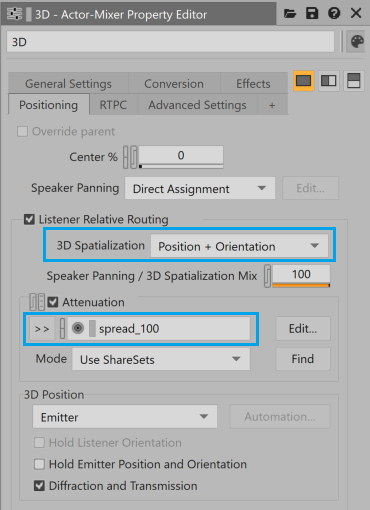
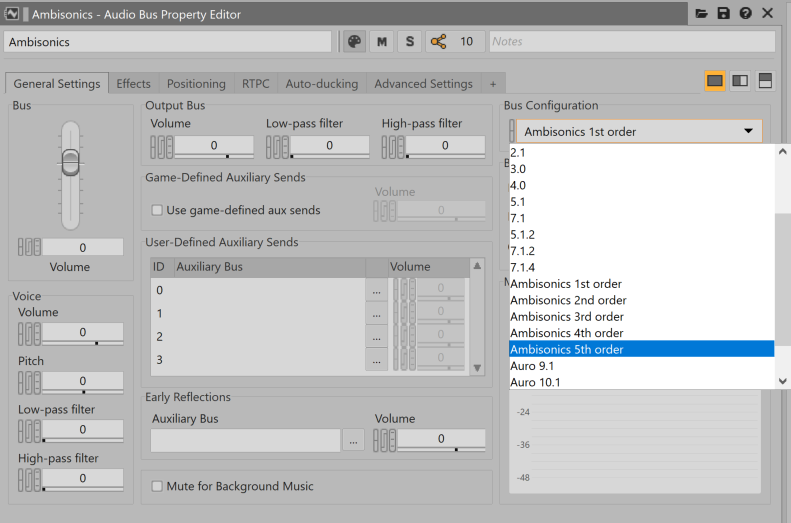
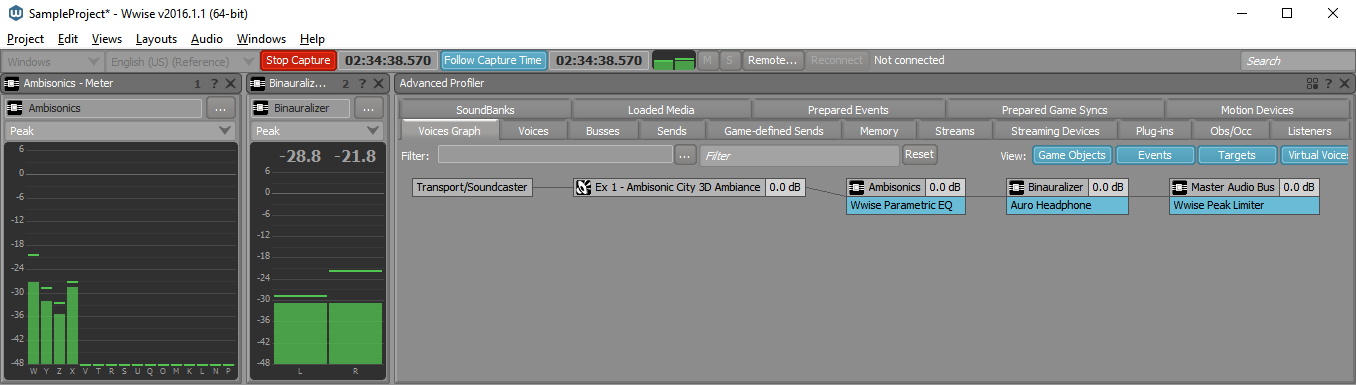
Wwise implements rotation of ambisonic sound fields automatically. The rotation corresponds to the relative orientation of the associated game object and its listener. To enable this magic, you need to set the ambisonic sound’s 3D Spatialization to Position + Orientation and route it to an ambisonic bus, as depicted in the screenshots below. Also, you need to make its Spread equal to 100% by adding an appropriate Attenuation Shareset, otherwise it will collapse into a mono point source because Spread is 0 by default. The game object and listener orientations are driven by the game through the Wwise API.
(Fig 1-a)
(Fig 1-b)
(Fig 1-c)
(Fig1-d)
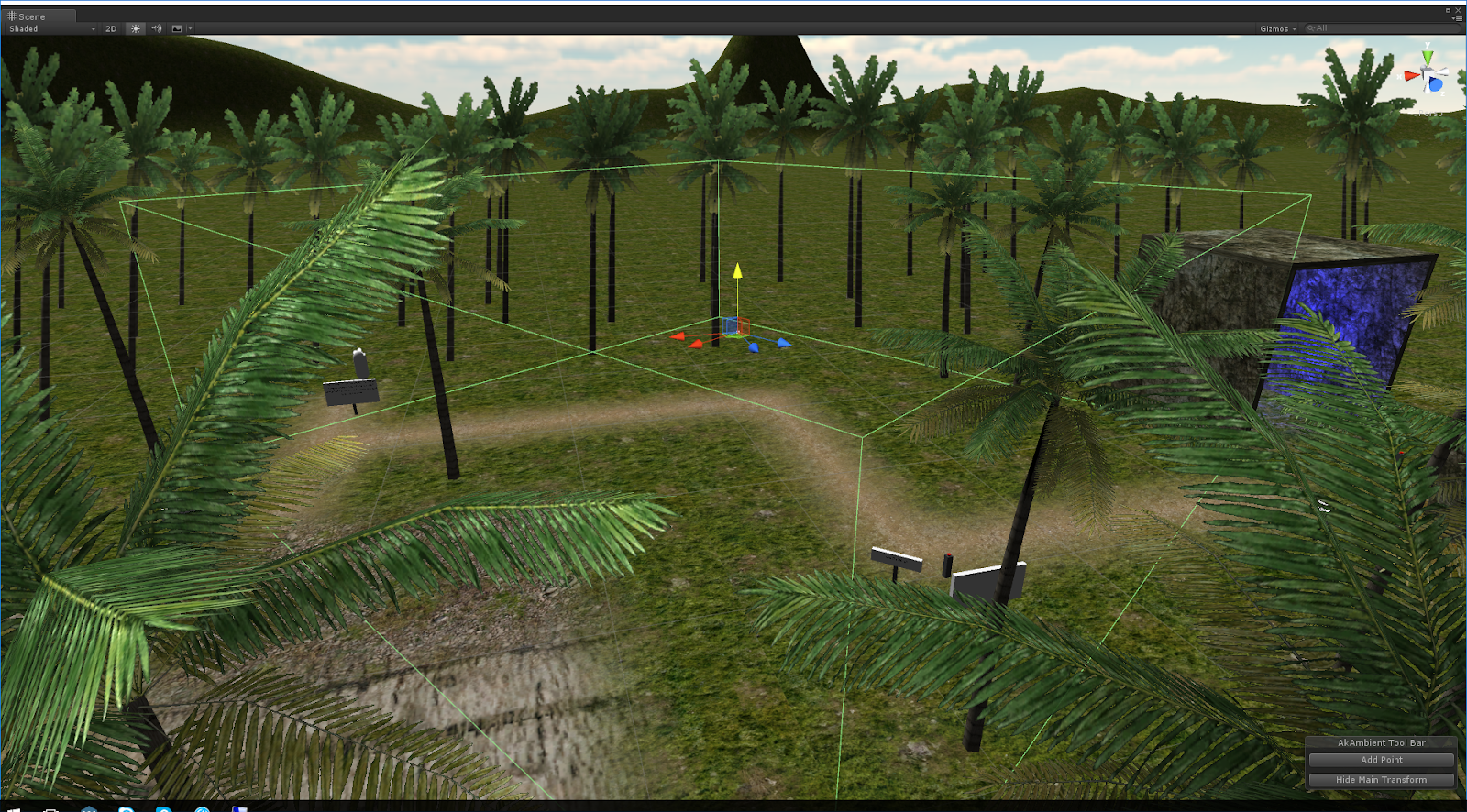
Figure 1 - Positioning and routing required for enabling rotation of ambisonics in Wwise. Notice the 3D and Game-Defined options selected in (a). The asset in question is routed to a bus with an ambisonic channel configuration. (b) shows how to set a bus to ambisonics. The routing can be observed in the Profiler view (c). The actual rotation is given by the relative game object and listener orientations driven by the game engine, here in Unity (d).
The following audio example illustrates ambisonic rotation. You should listen to it with headphones. Audio sample 1 was produced by playing an ambisonic file and converting it to binaural using the Auro Headphone plug-in in Wwise. In order to produce Audio sample 2, we simply changed the orientation of the listener (using a game engine) to point to the left, while the sound field's object orientation points to the front. The listener is rotated counterclockwise (towards the left), and this is why you hear the sound field rotated clockwise.
Audio sample 1
Audio sample 2
Ambiences Using Ambisonics Assets
The ease with which the channels of an ambisonics signal/bed/stream can be manipulated in order to rotate the sound field it represents makes it great for implementing dynamic ambiances in games. You need to play them back on game objects that are constant in orientation and point towards a specific reference. For example, if there is an auditory element with clear directionality in a recording, which maps to a visual element in the game, you will want to orient the game objects so that they align. When the Listener navigates in the space and changes orientation, the ambisonics sound field is automatically rotated as it is being mixed into the bus. Consequently, the sound field is coherent with the visuals.
Using recorded material
In Wwise, you can import ambisonics recordings that you have captured using an appropriate coincident microphone (such as http://www.core-sound.com/TetraMic/TetraMic-small3.jpg) after converting them to B-format (conventional 1st-order ambisonics). Most microphones come with their own software to transform the raw microphone signal, typically in A-format, to B-format**.
Here is an example of rotation done in Wwise with a field recording. The original audio, Audio sample 3 has been recorded using an SPS-200 microphone, converted to B-Format, and imported in Wwise. The most noticeable auditory event is the car horn, located slightly to the left in the original sample. To produce Audio sample 4, we turned the listener 90 degrees towards the left (as we did in the previous example), our next step was to play back and record the output. The car horn moved mostly to the right and all other sound sources rotated accordingly.
Audio sample 3
Audio sample 4
"Bouncing" Ambiences
It is possible to generate ambisonic sound files from an interactive session in Wwise using the Wwise Recorder plug-in. For example, you may create a complex ambience in the Wwise authoring tool by using a plurality of mono sources placed in space, mixing them in an ambisonics signal, and then recording that ambisonics signal using the Wwise Recorder plug-in. The next step would be to reimport the recorded ambisonics asset into your Wwise project, and use it as a rotatable 3D ambience in your game, exactly as if it were recorded material.
This workflow is similar to the "bouncing" or "freezing" option typically available in linear DAWs, such as Nuendo, Reaper, and ProTools. One motivation for bouncing an ambience to disk instead of keeping all its individual components for simultaneous playback is to save runtime resources (CPU and memory). This can be achieved by saving disk space and playing one multichannel file instead of many mono files at the same time.
Bouncing ambiences in Wwise
- Create a bus and set its channel configuration to Ambisonics (any order).
- Insert a Wwise Recorder plug-in on that bus. Since it is an ambisonics bus, the audio will be written to file in the ambisonics format.
- Route all your individual mono sources (or their common parent) to this bus.
- Place each source in space using the Automation Editor in either Emitter with Automation or Listener with Automation modes.
- Trigger them at opportune times using a Soundcaster Session, an Event, a Random Container, or any combination thereof. When all sounds stop playing, because they are finished or because they are stopped, the audio will be "bounced" to disk. You may import it in your project directly by clicking the Import in Wwise... button on the Recorder plug-in.
- Inspect this new asset and set its positioning type to 3D. When played from the game, it will be rotated as described previously.
(Fig 2-a)
(Fig 2-b)
(Fig 2-c)
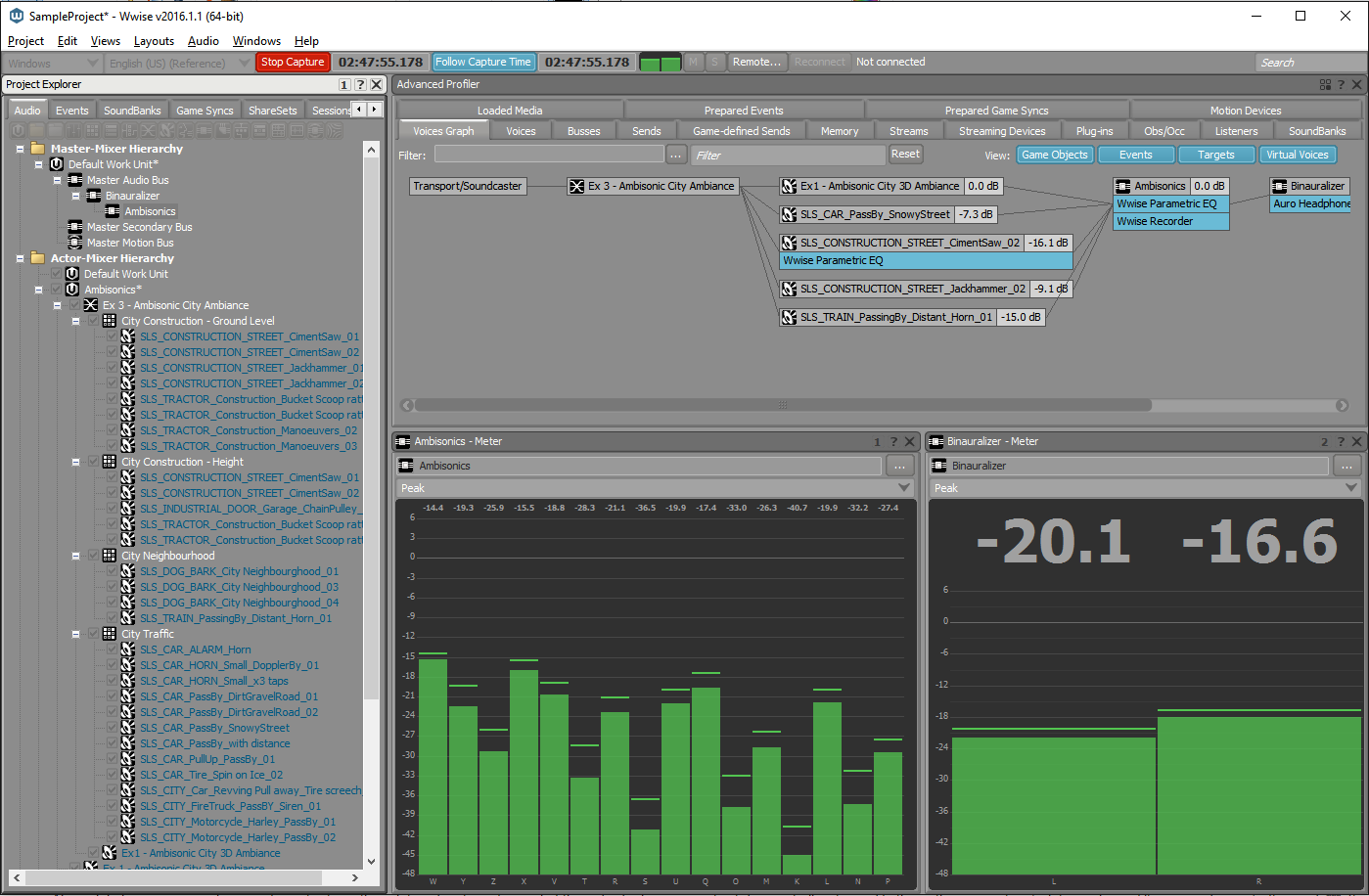
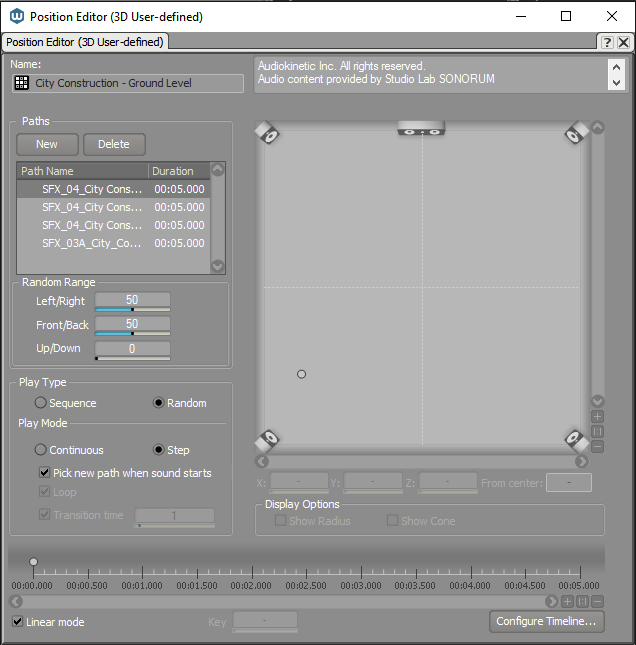
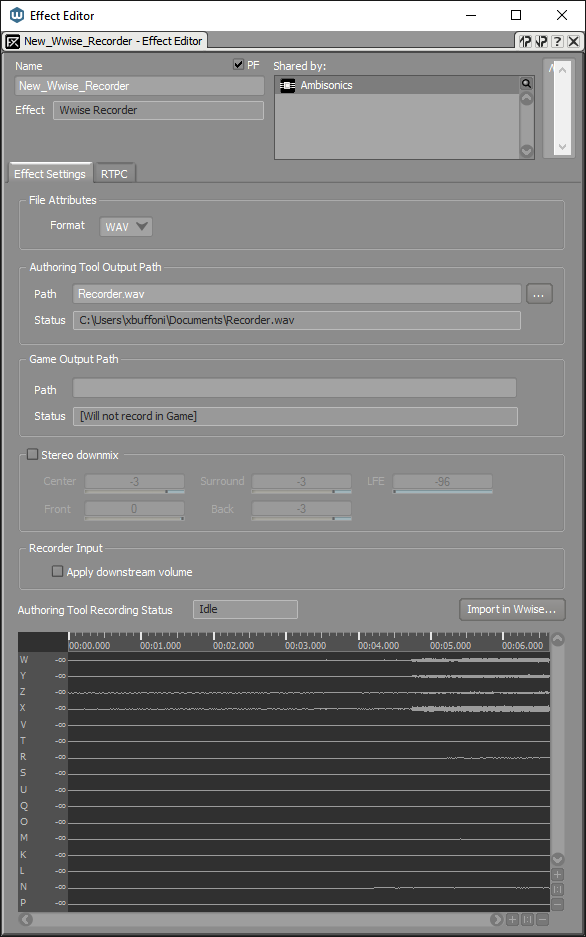
Figure 2 - The Ambisonics City Ambience Blend Container of the Wwise Sample Project being recorded into a single ambisonics file. The Project Explorer view on the left of screenshot (Fig 2-a) shows the ambience made of the recording mentioned above (Ex1 - Ambisonic City 3D Ambiance), superimposed with a large number of individual sounds, and mixed and played back using various behaviors specified in the Random Containers. Screenshot (Fig 2-b) shows an example of how an asset (or group of assets) has been placed in space using the 3D User-Defined Position Editor. Screenshot (Fig 2-c) shows the settings of the Wwise Recorder plug-in. More details on this plug-in.
As explained in a previous blog, Ambisonics as an Intermediate Spatial Representation (for VR), you may record up to 5th order ambisonics for improved spatial precision, but, the increase in the required number of channels (9, 16, 25 and 36 channels for 2nd, 3rd, 4th and 5th order respectively) and, consequently, memory demands, may outweigh such improvements. Also, while recorded ambisonics retains the relative arrival direction of its individual components, it does not allow modifying their individual properties–such as their relative volume and filtering–afterwards***.
Footnotes
* As long as the ambisonics format is "full-sphere".
** Wwise accepts AMB files in FuMa convention, identified by a proper GUID in their headers. See more
*** Some signal processing techniques allow one to do such things. However, in our context they are fairly irrelevant since we already have access to the individual components prior to mixing them.
Figure 2 - The Ambisonics City Ambience Blend Container of the Wwise Sample Project being recorded into a single ambisonics file. The Project Explorer view on the left of screenshot (Fig 2-a) shows the ambience made of the recording mentioned above (Ex1 - Ambisonic City 3D Ambiance), superimposed with a large number of individual sounds, and mixed and played back using various behaviors specified in the Random Containers. Screenshot (Fig 2-b) shows an example of how an asset (or group of assets) has been placed in space using the 3D User-Defined Position Editor. Screenshot (Fig 2-c) shows the settings of the Wwise Recorder plug-in. More details on this plug-in.
Credits
-Screenshot Figure 1(d): Unity 3D
-Recorded 3D Ambience Sample, and modified version:
Ambisonic B-Format ambiance from A-Format SPS200 microphone recording.
Audiokinetic Inc. All rights reserved.
Audio content provided by Studio Lab SONORUM
(c) 2016. www.sonorum.ca
The Audio Content contained in this file is the property of Studio Lab SONORUM. Your sole right with regard to this Audio Content is to listen to the Audio Content as part of this Sample Project. This Audio Content cannot be used or modified for a commercial purpose nor for public demonstration.



댓글
David Eisler
September 20, 2016 at 02:52 pm
Wow. This seems really groundbreaking, or at least awesome