
Most game developers use a version control system to store their project files and facilitate the collaborative nature of their work. This article aims to answer the following question: What files in a Wwise project folder should be stored in version control?
The Good
In order to answer that question, we will start by explaining which files are essential for the creation of the final audio assets of a Wwise project. Maximilien Simard Poirier, a sound designer working at Audiokinetic, made a video tutorial that covers this topic; it can be found here.
The Wwise Project and Work Unit Files
All the essential files can be identified by taking a look at the File Manager (Shift+F1). Here is what we see when we open this dialog with the Cube Wwise project loaded:
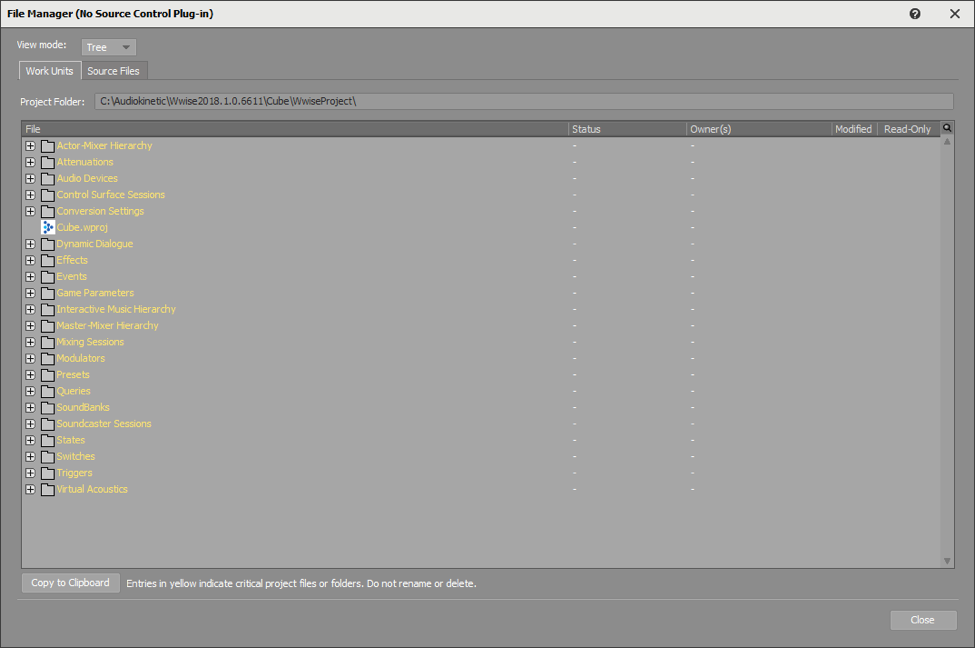
This tells us that the Cube.wproj and all the folders seen here are critical to the project. If we expand the Actor-Mixer Hierarchy folder, we see the following:

This indicates that the Actor-Mixer Hierarchy folder must exist and contain at least the “Default Work Unit.wwu” file. If the Actor-Mixer Hierarchy folder is deleted from the project’s folder, Wwise will recreate it along with the (empty) Default Work Unit.wwu and warn the user when the project is loaded. Although they are not critical for Wwise to be able to open the project, the other Work Unit files are also required for the project to work as designed. Consequently, all the files shown in the Work Unit tab of the File Manager should be added to the version control system.
Content of a Wwise Project Folder
If we take a look at the content of the project folder, we see it contains the previously mentioned items and a few others:
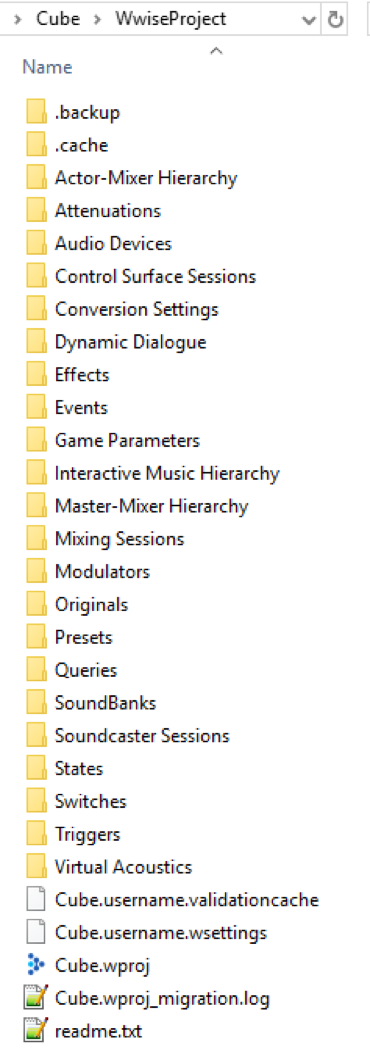
The .validationcache and .wsettings files are user-specific and should not be added to version control. The IncrementalSoundBankData.xml file is used to know what SoundBank content has changed and needs to be updated when we generate the SoundBanks of the project. It does not belong in version control as it reflects the state of the SoundBanks based on the local content of the Wwise project and local SoundBank generation history. The .cache folder is rarely added to version control; we will discuss the .cache folder and its content later in this article.
Wwise Sources (a.k.a. Originals)
If we click on the “Source Files” tab of the File Manager, we have the following:
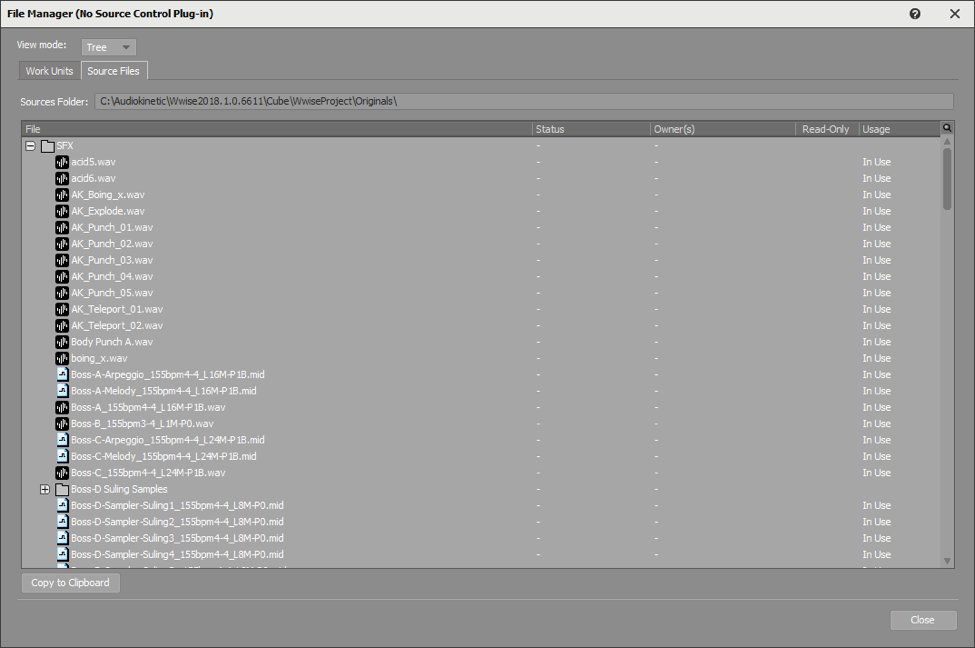
This shows the folder structure found under the Originals folder and all WAV and MID files used by the Cube project. All these files are required to recreate the final audio assets of a Wwise project, which are SoundBanks, and streaming and loose files. All of these source media files should be added to the version control system.
Content of the Originals Folder
If we navigate to the Originals folder with the Windows File Explorer, we see the following content:
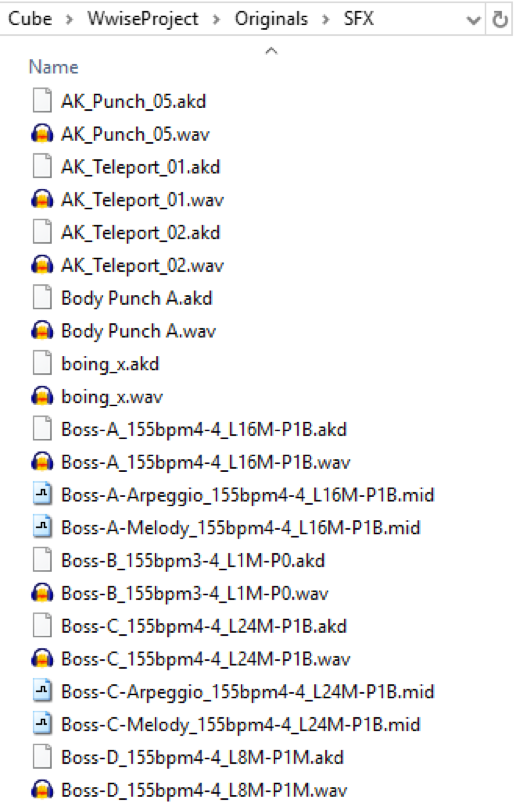
Every WAV file has a corresponding AKD file that contains metadata about the audio content of the WAV files. The AKD files contain data for Loudness Normalization and/or HDR envelope tracking if these features are selected in the Wwise project. They also contain peak analysis data that Wwise performs when audio files are imported into a project. The AKD files do not need to be added to version control as they will be created by Wwise as needed.
The Bad
Now that we know which files are essential for the creation of the final audio assets of a Wwise project, we ask ourselves if we should also add SoundBanks and streaming and loose files to version control; the answer is maybe. If you have members of your team who do not use Wwise but need to be able to hear the sounds while playing the game in development, then they will need these files, and version control could be the most convenient way to provide them with access. If that option is selected by your team, the “bad” thing that could happen is SoundBanks becoming de-synchronized. For example, if updated SoundBanks are added to the version control system but the new Init.bnk is not, the sound engine will report errors when it tries to load the new SoundBanks. Another example where this could happen is a mismatch between streamed files and their prefetch which is included in the SoundBank; if both are not from the same generation, it could lead to audio glitches or crashes. A good solution for these potential issues is to designate a system and/or a team member to build all the audio assets and commit them to version control, periodically. Using this “SoundBank Build Machine” practice can save you from problems caused by mismatching audio assets.
Files in the SoundBank Path Folder
SoundBank files are always generated because they contain the converted media, they also contain the structures and Events relating to the sounds. Streaming files are only present when one or more of the sounds in the Wwise project have the “Stream” option selected in their General Settings. Loose files (or loose media) are present when you choose to use the Prepare Event method to manage your media.
The Cube project contains a single streamed file and does not use Prepare Event. Consider the options selected under the SoundBanks tab of the Project Settings (Shift+K):
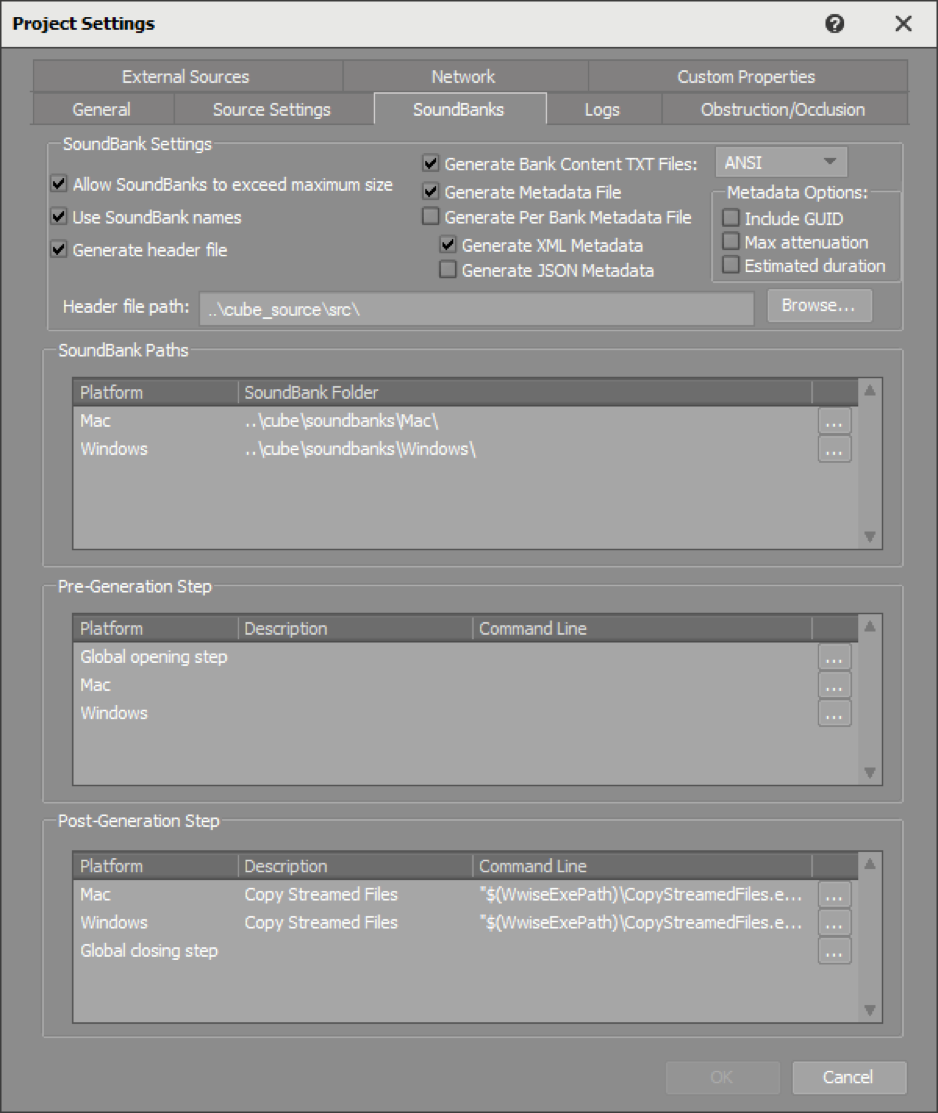
The resulting content of the generated SoundBanks folder will be:
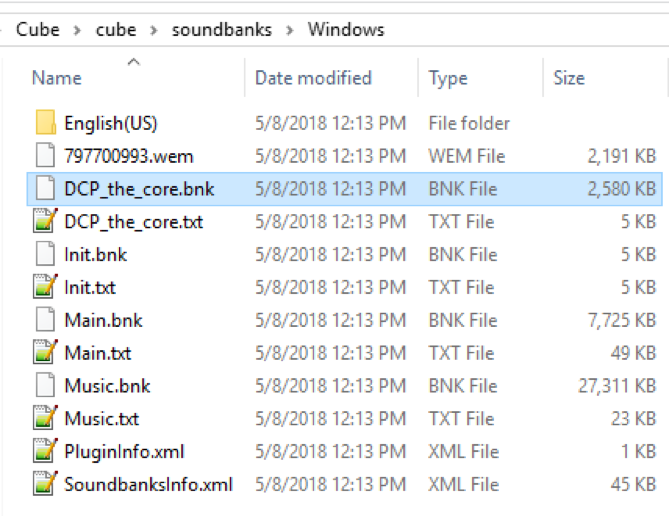
The English(US) folder is empty because this Wwise project does not contain any localized Sound Voice objects. Wwise needs to access the four BNK files and the 797700993.wem streaming file at runtime to play the sounds included in the project. The PluginInfo.xml file lists all the plug-ins that are required by the content of the SoundBanks being generated. The SoundbanksInfo.xml file is used when the SoundBanks are generated; namely, they indicate what streamed files should be copied from the cache by the CopyStreamedFiles.exe tool. These two XML files normally should not be added to version control as they are only used by Wwise when generating SoundBanks, and Wwise will re-generate them if they are not present when needed.
The NameOfSoundBank.txt files are present because the “Generate Bank Content TXT Files” option is checked. These are not required to play the sounds but could be used to integrate Wwise in your toolchain. Check with your audio programmer if they use their content to support features in your game engine. If they do, then they will want the “Generate Bank Content TXT Files” to be added to version control.
In short, if you decide to add your runtime audio assets to your version control system, you should add all BNK and WEM files found under the SoundBank path. You may want to add TXT, XML, and/or JSON files depending on how Wwise is integrated with your game engine.
The Ugly
Now that essential and optional files have been covered, let’s take a look at the files that should not go to the version control system.
Contents of the .cache Folder
We have talked about most of the content of a Wwise project so far. One missing piece is the .cache folder. As stated in the documentation: “The project's cache folder contains intermediate data generated by Wwise during audio file conversion and SoundBank generation.” As a general rule, this folder should not be added to the version control system. The contents of the Cube project’s .cache folder are mostly WEM files:
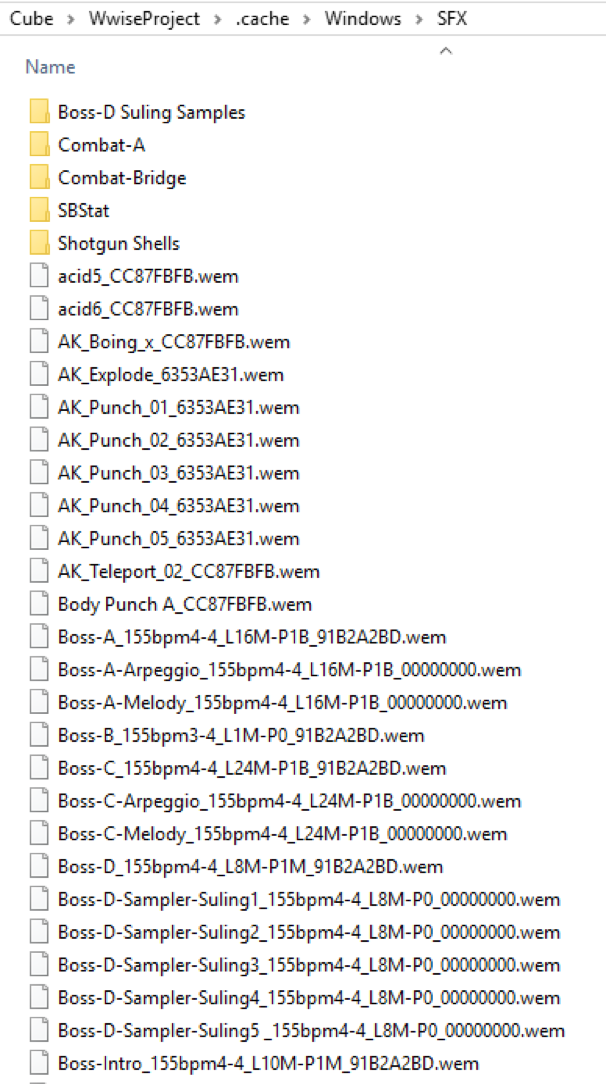
These files have the same name as their source WAV files with an added hexadecimal number before the WEM file extension. When the content of the Originals folder is encoded, the WAV files are converted using the audio codec specified in the Conversion Settings for every item in the project. If an Effect has the Render option selected, the Effect is rendered in the WEM. If the audio source has been trimmed in Wwise’s Source Editor, only the active part of the source is included in the encoded file to save memory. Modifications applied to any of these will be reflected in a change of the hexadecimal number before the WEM file extension.
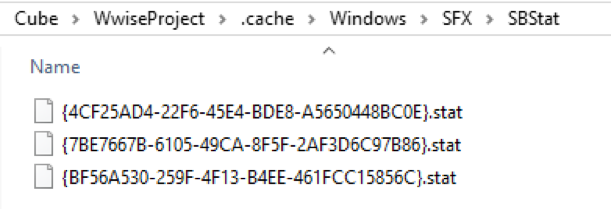
There are also SBStat folders in the .cache that contain {GUID}.stat files, as shown below. These temporary file are used by the Wwise SoundBank Manager view to show the Data Size and the Decoded Size of SoundBanks. The Data Size is the in-game memory size for the selected platform and the Decoded Size is the in-game memory of the decoded Vorbis media.
Although it is not meant to be shared, as its content can always be recreated when the Wwise project and originals are available, some teams choose to add the contents of the .cache to version control. The main motivation for this is that when the Wwise project contains a great number of audio assets, the conversion process to recreate the .cache can be time-consuming. The problem with this approach is that any change to a property, Conversion Setting, or Audio Source leads to a change to the filename saved to the .cache folder, and this can lead to many unneeded files being added to the version control repository.
The .backup Folder
Another folder that can be found under the root of your Wwise project is the .backup folder. This folder is automatically created by Wwise when you open your project with a newer major version of Wwise, and the project is upgraded. In case you want to revert a Wwise upgrade of your project, you can use the content of the .backup folder. There is no reason to add the content of this folder to version control since you can simply retrieve a version of your Wwise project prior to the upgrade to get the same files.
Conclusion
It is good practice to add the project, Work Unit, and original WAV files to version control. Adding your SoundBanks and streamed and loose files requires that you pay attention to keeping them synchronized; failing to do that is bad. Adding the content of the .cache folder should be avoided as it could get ugly. I hope this article helped you understand which files of your Wwise project folder should be added to your version control system!

댓글