
In our previous blog, Simulating dynamic and geometry-informed early reflections with Wwise Reflect in Unreal, we saw how to mix sound with the new Wwise Reflect plug-in using the Unreal integration and the Wwise Audio Lab sample game. In this blog, we will dive deeper into the implementation of the plug-in, how to use it with the spatial audio wrapper, and how it interacts with the 3D-bus architecture.
Wwise Reflect implementation
The Wwise Reflect plug-in uses the image source method [1] to model reflections. An image source is an image of an emitter positioned at equal distance behind a reflective surface, as if the reflective surfaces were mirrors. If we trace a line between the image source and the listener, it will cross the reflective surface at the point where the sound will be reflected, just like light rays on a mirror would. The following image shows a bird's eye view of an emitter (E) and a listener (L) in a room. The blue dots represent the first order image sources, and the dark blue lines the sound path from the emitter to the listener. The light blue lines show how the path is direct from the image source to the listener.
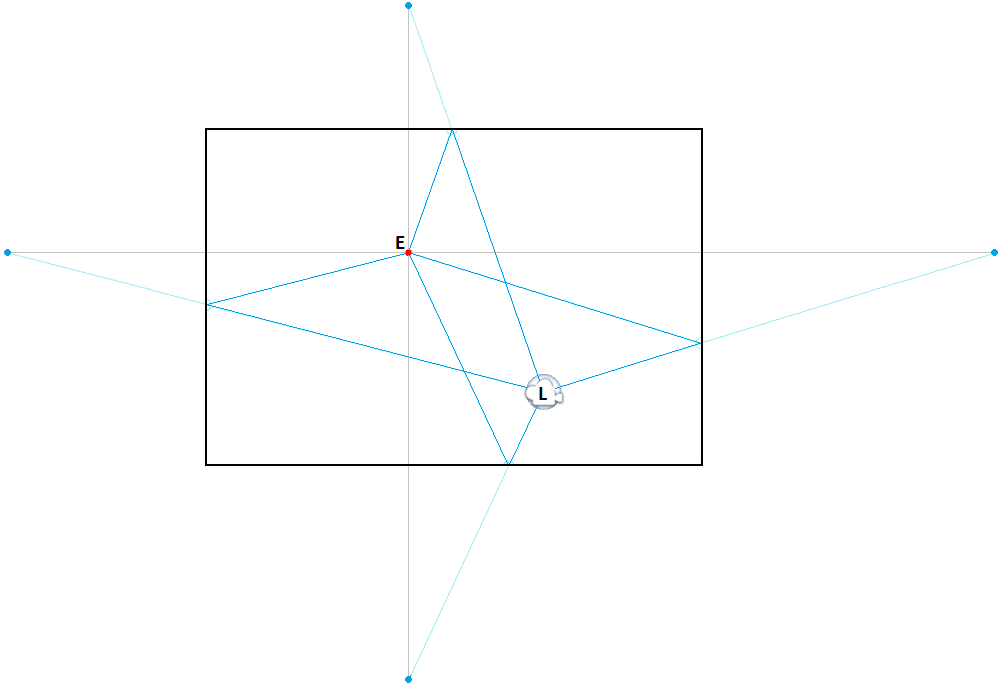
The Wwise Reflect plug-in is applied to an emitter game object. The effect needs the position of the emitter, image sources, and listener. With this, it is possible to compute the distance between an image source and the listener and, consequently, the distance the emitted sound has traveled. To simulate a reflection, the dry sound is fed to a delay line. The length of the delay line is set according to the traveled distance and the speed of sound, which can be tweaked from the Wwise Reflect plug-in UI. A distant image source will be reflected at a later time than a closer image source. Then, the Wwise Reflect plug-in computes the positioning between the image source and the orientation of the listener and mixes everything back to the original channel configuration. Since only Wwise Reflect has the image source positions, positioning has to be done at this stage.
There are lots of ways the user can alter the sound of the reflections. Like we covered in our previous blog, there are curves available on the Wwise Reflect Plug-in Editor to apply attenuation and frequency filters according to distance. On the game side, the Acoustic Textures can be used to apply another layer of filtering to differentiate the rooms in which the emitter is currently. Acoustic textures simulate frequency-dependent absorption of the reflective surface's texture. As you can see in the picture below, acoustic textures, located under Virtual Acoustics in the ShareSet tab of the Project Explorer view, have four frequency absorptions and a global offset. By default, Wwise Reflect maps the bands such that the low frequency is up to 250 Hz and each band is 2 octaves, which makes edge frequencies at 250, 1000, and 4000 Hz. The absorption number represents the amount of sound that will be absorbed by the surface for a specific frequency band. For example, the Carpet Acoustic Texture completely absorbs the high frequencies and only reflects ~50% of the energy in the low and mid low frequencies. All bands may be changed at once using the Offset slider, but Reflect will clamp the effective value between 0 and 100 internally because a reflective surface will not amplify the sound that bounces off it.
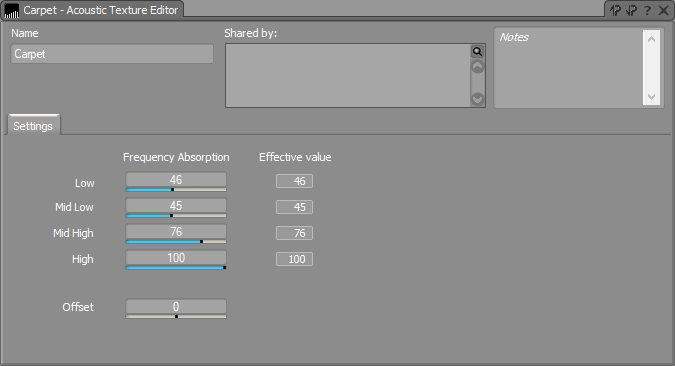
Image Source Computation
We now know that the Wwise Reflect plug-in simulates image sources with delay lines, filters, and panning. The computation of the position of these image sources must be done before calling the Wwise Reflect plug-in. You can compute them yourself and call the Wwise Reflect plug-in API directly, or you can use the Spatial Audio API. The Spatial Audio API is a wrapper that let's you use the Wwise Reflect plug-in and other spatial audio components like rooms and portals. It can compute the image source positions that an emitter will create on a geometry according to the listener, at all times. All it needs are the triangles of this geometry. This means that it can be applied to any shape. Each triangle can also have its own Acoustic Texture.
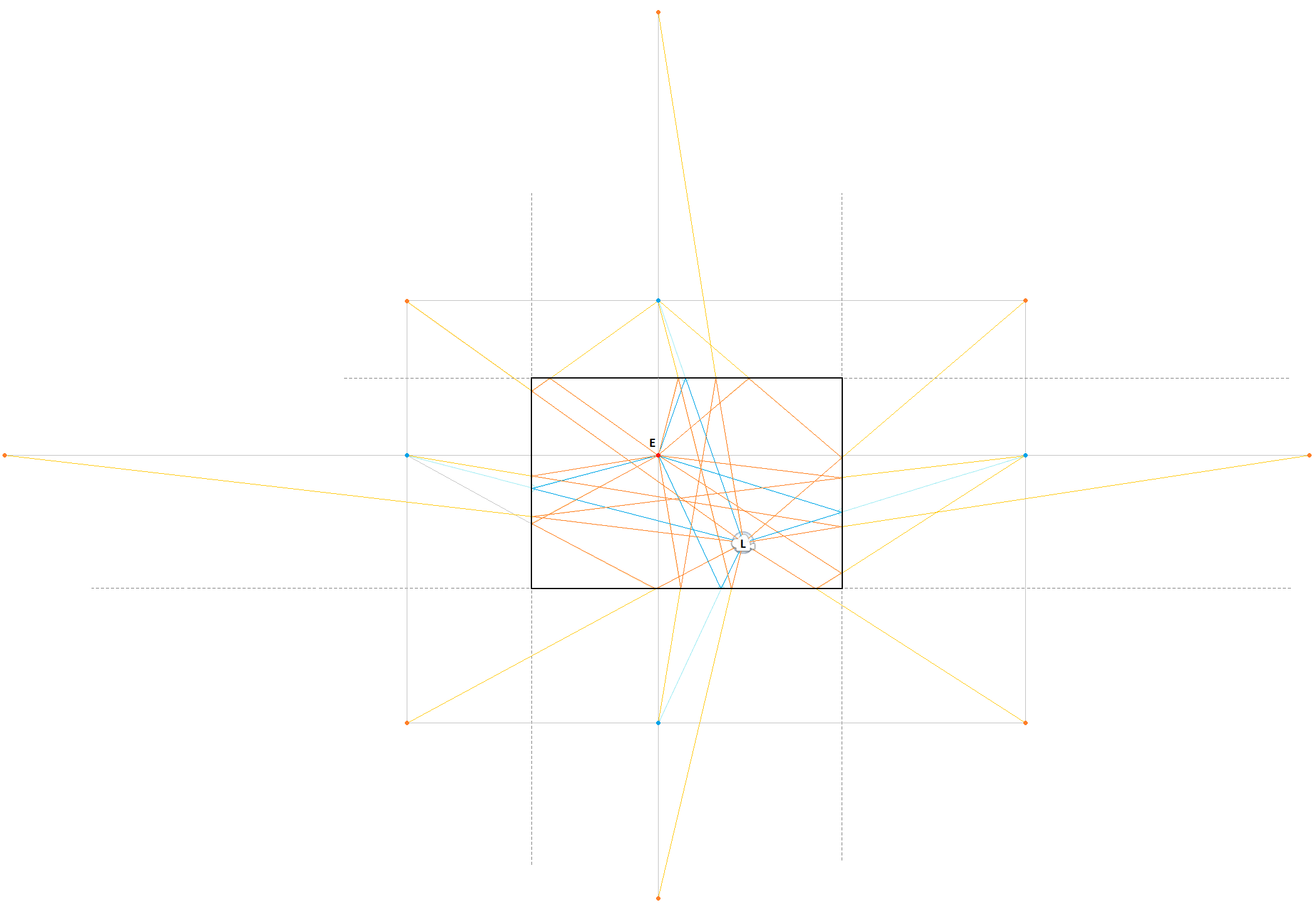
The number of image sources created will depend on the order of reflection of the emitter. With 2017.1, we support up to 4 orders of reflections. When we covered image sources in the previous section, we only talked about first order reflections: when the sound bounces off a surface one time before reaching the listener. You could describe second order image sources as the image sources of the first order image sources; see the image below. The sound reflected from a second order reflection will bounce off two surfaces before reaching the listener. It will also be filtered by the two acoustic textures it has touched. As you might have realized, the number of reflections will increase exponentially with each order of reflection.
Wwise Project
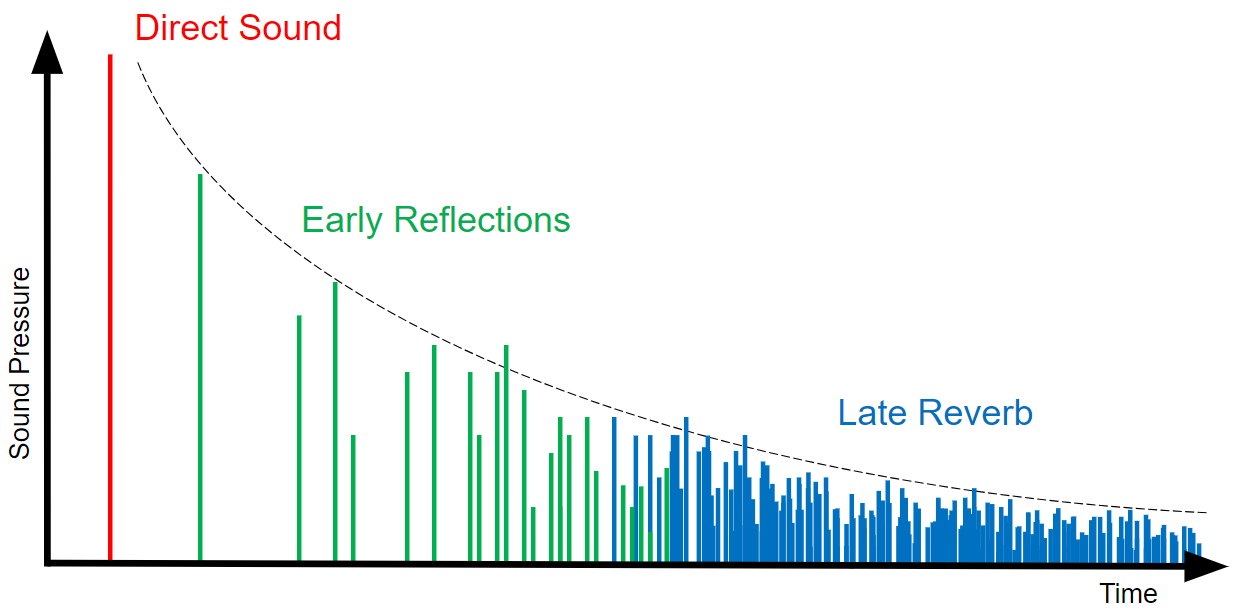
When a sound is emitted, it is reflected by the surrounding surfaces creating a huge number of reflections and it will continue until it is absorbed by the surfaces and air, as shown in the following image. The first reflections are called early reflections and are simulated by the Wwise Reflect plug-in. The remaining reflections are called late reverberation and can be simulated by other plug-ins in Wwise. Unlike the Wwise Reflect plug-in, which is applied per emitter, the late reverb plug-ins offered in Wwise are typically applied per room/area of a game. They depend on the room's size and general acoustic properties to create some precomputed early reflection effects, but are not exactly geometry based as is Wwise Reflect.
As explained in the previous section, the Wwise Reflect plug-in is applied per emitter. Instead of applying the Effect per voice, which would be too heavy, we do it per emitter by placing it on an Auxiliary Bus. In WAL, when the player fires the weapon, the weapons' voice is sent directly to the listener and is also sent to the Auxiliary Bus where the Wwise Reflect plug-in is applied. On the Auxiliary Bus, we have one Wwise Reflect Effect ShareSet applied. In the previous Wwise Reflect blog, we showed you how to configure the parameters of the Wwise Reflect Effect Editor.

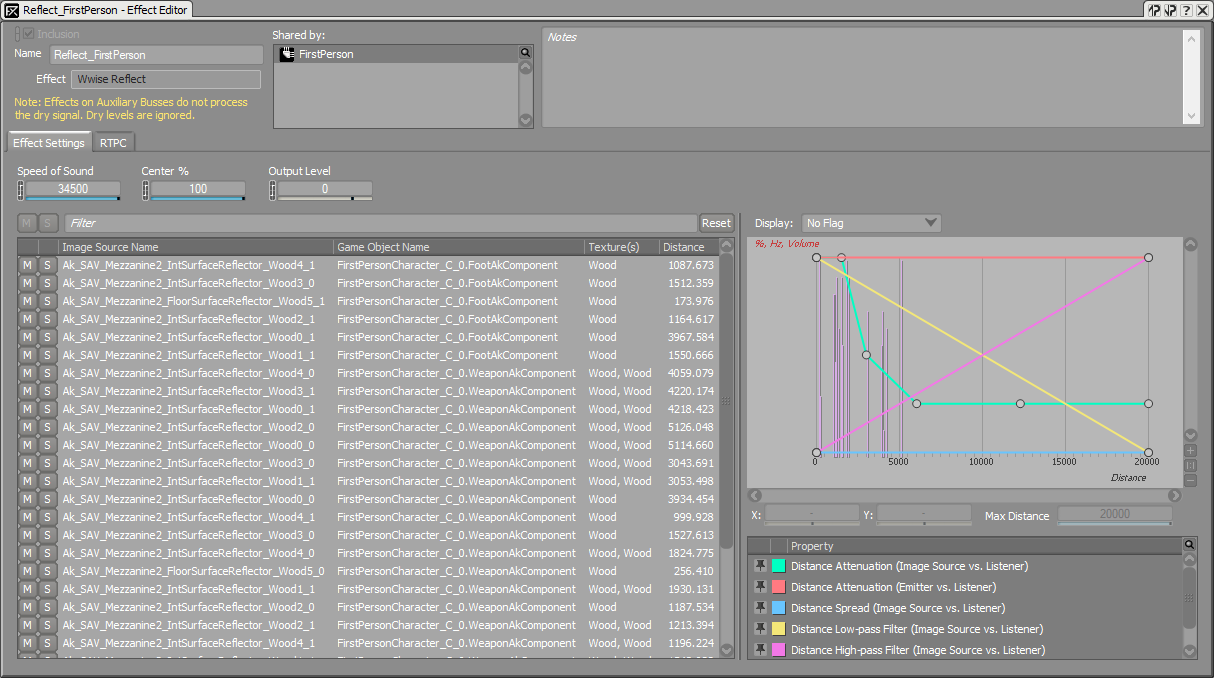
The magic of 3D busses will instantiate one Auxiliary Bus per emitter. We can illustrate this when two voices use the same Auxiliary Bus with Wwise Reflect. For example, in WAL, the player also has a foot emitter for footstep voices. Wwise Reflect is applied to both these emitters using the same Auxiliary Bus called FirstPerson. When the player walks and fires at the same time, you can see the following graph. Each emitter, WeaponAkComponent and FootAkComponent, sends its voice to the same FirstPerson Auxiliary Bus, but the graph shows two distinct Auxiliary Busses. With this, each emitter has an instance of FirstPerson and it will be spatialized differently for each of them.

Since the weapon and the foot emitters both use the same Auxiliary Bus, their Wwise Reflect Effect will be configured by the same Wwise Reflect ShareSet. When opening the Wwise Reflect Effect Editor while firing and walking, you will be able to see the image sources of both of the emitters on the same list and graph, as shown in the screen capture below.
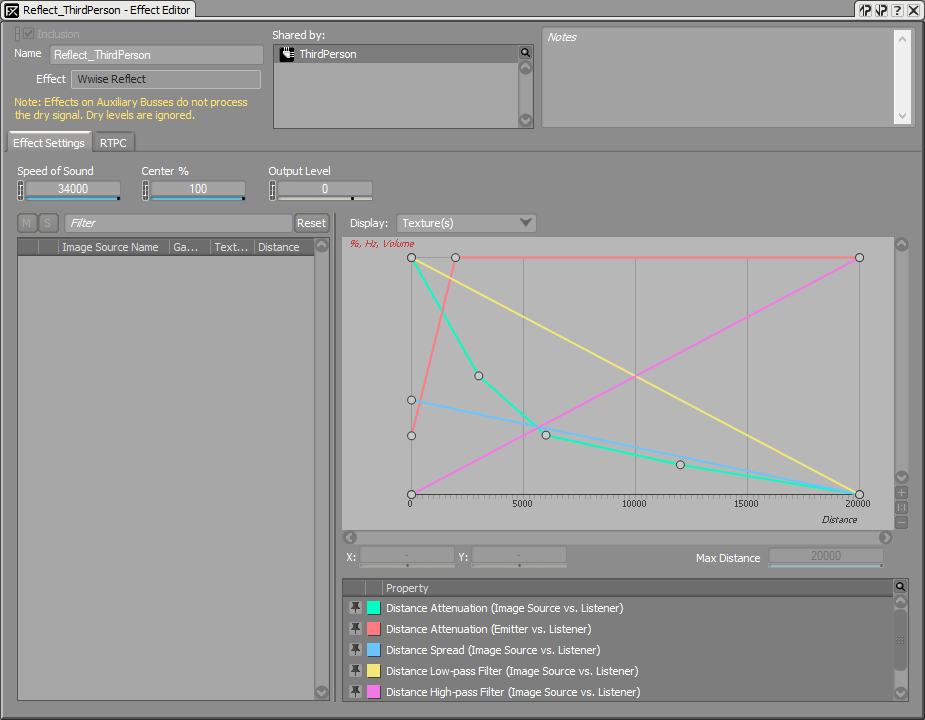
If you want the sounds emitted by a different emitter than the player to also reflect on geometry, it is best to create another ShareSet. In WAL, we have a ThirdPerson Auxiliary Bus with another Wwise Reflect ShareSet applied to it for a radio component. This way, we can configure the Wwise Reflect Effect parameters differently for first-person and third-person emitters. One reason is that the Distance Attenuation (Emitter vs. Listener) curve, which is used for the radio component, reduces the volume of the reflections when the listener is near it. Even if not physically accurate, it can help the user focus on the emitter without being distracted by early reflections. You can see the configuration of the ThirdPerson Reflect Effect Editor in the following image.
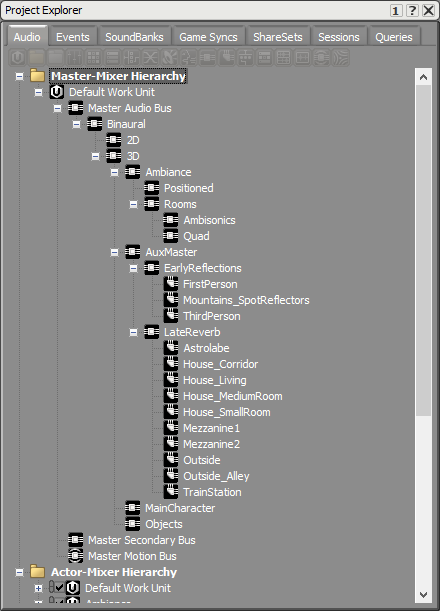
Here is the Master-Mixer Hierarchy of the WAL project. There are three Auxiliary Busses with a Wwise Reflect Effect: FirstPerson, ThirdPerson, and Mountains_SpotReflectors. This last Auxiliary Bus is used for individual reflectors we have put on the mountains to simulate an echo.
Late Reverb and Wwise Reflect
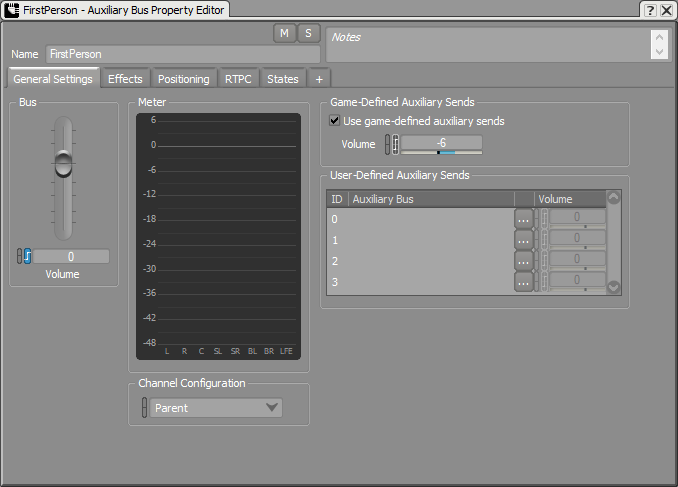
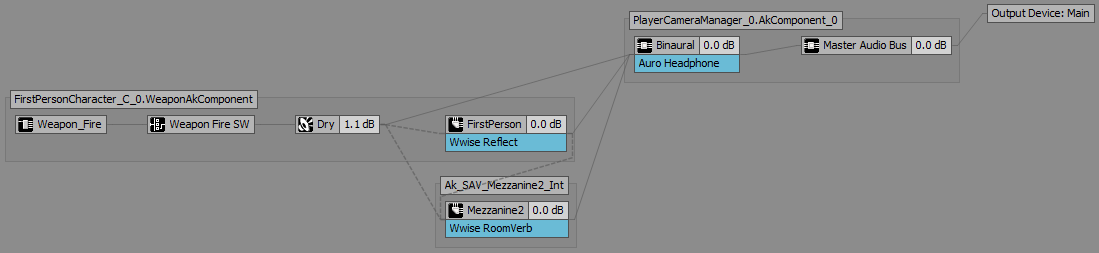
At the beginning of the previous section, we touched a little bit on the subject of late reverberation; they are applied per room and are not geometry based. With the Wwise Reflect plug-in, you can also enhance the late reverb plug-in's response. By feeding it with the Wwise Reflect geometry based early reflections, it will color the reverb with the acoustic textures of the room and will increase echo density. This is done by enabling game-defined auxiliary sends on the Auxiliary Bus with the Wwise Reflect Effect. In the following image, the FirstPerson Auxiliary Bus has game-defined auxiliary sends enabled. Each time the player enters one of the areas in WAL which are configured to have a reverb, the early reflections of the player's weapon and footsteps sounds will be fed to that reverb.
For example, if we fire the weapon in the Mezzanine 2 building, we can see the following graph. Dotted lines represent auxiliary sends. The weapon's voice is sending to both the Wwise Reflect and RoomVerb Effects, which are placed on their respective Auxiliary Busses, as well as outputing directly to the listener. The FirstPerson Aux Bus outputs early reflections to the listener, but also sends them to the Mezzanine2 Aux Bus.
Conclusion
With this blog and Simulating dynamic and geometry-informed early reflections with Wwise Reflect in Unreal, on Wwise Reflect, we hope you are now well versed in the subject and that you will be able to use the Effect at its full potential to create geometry-defined early reflection in your games. Know that not all emitters need Wwise Reflect, and you should select the ones that would really enrich the sound of your game without being too much.

References
[1] Savioja, Lauri. "Image-source Method in a Rectangular Room." Room Acoustics Modeling with Interactive Visualizations. (accessed September 11, 2017)



댓글
Kristina Wolfe
November 23, 2017 at 06:47 pm
This is great but I would like a tutorial on how to integrate reflect into unity. No documentation and you've said "soon" since August.